Introduction
If you have estimated an item response theory (IRT) model in R, there is a good chance that you have used the mirt package (Chalmers, 2012). Developed and maintained by Dr. R. Philip Chalmers, mirt can estimate almost any IRT model you can think of: unidimensional and multidimensional models, the Rasch model and the 2PL to 4PL models, graded response and partial credit models, bifactor models, multiple-group models, mixed-effects models, and many more. It is fast, it is well tested, and it has been developed continuously for more than a decade.
However, mirt was built for estimation, and estimation is only one part of a psychometric analysis. Once the model is estimated, we still need to decide whether it is the right model, check whether the items behave well, look for differential item functioning (DIF), make figures, and explain the results to people who are not psychometricians (e.g., teachers, test developers, or a certification board). Each of these steps is possible with mirt, but each one needs a different function, a different set of arguments, and some knowledge of how to read the output. For experienced R users, this is not a problem. For students taking their first measurement course or for researchers who are new to R, it can be a real barrier.
This is the gap I wanted to fill with mirtverse (Bulut, 2026). mirtverse is a “friendly workflow and reporting layer” for mirt. It does not estimate anything itself. Instead, it takes ordinary mirt models and adds the tools around them: a model selection assistant, plain-language interpretation, tidy outputs, ggplot2 graphics, item health cards, one-call reports, interactive dashboards, a point-and-click workbench, and more. In this post, I will first give some background on IRT and mirt, and then walk through the main features of mirtverse with a real example. The package website, www.okanbulut.com/mirtverse, has the full documentation of every function.
A Brief Background on IRT and mirt
Let’s start with a few terms that we will use throughout the post.
- Item response theory (IRT): A family of statistical models that link a person’s responses to test items to an unobserved (i.e., latent) trait, such as numeracy, reading ability, or anxiety (Embretson & Reise, 2000). The latent trait is usually denoted by \(\theta\) (theta).
- Item parameters: Numbers that describe how an item behaves. The two most common ones are difficulty (or location, \(b\)), which shows where on the \(\theta\) scale an item is most useful, and discrimination (\(a\)), which shows how sharply the item separates people with lower and higher \(\theta\).
- Item characteristic curve (ICC): A curve that shows the probability of answering an item correctly at each level of \(\theta\). It is also called a trace line.
- Information: How precisely a test (or an item) measures \(\theta\) at each point on the scale. More information means a smaller standard error.
The most common IRT models for items scored as correct (1) or incorrect (0) differ in how many item parameters they estimate. The two-parameter logistic (2PL) model, for example, writes the probability that person \(j\) answers item \(i\) correctly as
\[P(X_{ij} = 1 \mid \theta_j) = \frac{1}{1 + \exp[-a_i(\theta_j - b_i)]}.\]
The Rasch model fixes \(a_i\) to be the same for every item, and the 3PL model adds a lower asymptote (\(c_i\), often called the guessing parameter) for multiple-choice items where low-ability test takers can still guess the correct answer.
With mirt, fitting a 2PL model is a single line: mirt(data, model = 1, itemtype = "2PL"). But what comes next is where most users get stuck. Should I use the Rasch, 2PL, or 3PL model? Is the model fit acceptable? Which items are problematic? Are any items biased against a subgroup? How do I make a figure for my paper? How do I explain these results to a non-technical audience? mirtverse was designed to answer these questions with as little code as possible.
Why mirtverse?
I designed mirtverse around four principles:
- mirt does the estimation, always. mirtverse never changes how models are estimated. Every mirtverse function accepts a model created with
mirt::mirt(), and every model that mirtverse creates is an ordinary mirt object. So, you can move between the two packages at any point. - Results should be readable. Instead of a long list of numbers, mirtverse tells you what the numbers mean (e.g., “Marginal reliability is 0.88 (good)”) and which items need your attention.
- Outputs should be easy to reuse. All tables are tidy data frames, and all figures are ggplot2 objects that you can modify like any other ggplot.
- Not everyone writes R code. Some users prefer clicking, some prefer describing the analysis in plain language, and some only need to see the results. mirtverse offers a route for each of them, and each route writes reproducible R code.
The following table summarizes the main features of mirtverse and the functions that provide them.
| Feature | Functions |
|---|---|
| Model selection assistant | select_model() |
| Plain-language interpretation | interpret(), interpret_prompt() |
| Tidy outputs | tidy(), glance(), augment(), item_table() |
| ggplot2 graphics (trace lines, information, Wright maps, fit, local dependence) | gg_trace(), gg_info(), gg_wright(), gg_itemfit(), gg_q3(), gg_scores(), autoplot() |
| Item health cards | item_card(), item_cards() |
| Differential item functioning in one call | dif(), gg_dif() |
| Response-time modelling and rapid-guessing detection | fit_rt(), sim_rt() |
| One-call HTML report | mv_report() |
| Dashboard for people who do not use R | mv_dashboard(), export_dashboard() |
| Point-and-click workbench with R code export | launch_workbench() |
| Analysis scripts from a plain-language request | mv_ask(), mv_ask_setup(), run_script() |
| Translating ltm, eRm, TAM, and irtQ code into mirt code | mirtify(), mirtify_crosswalk() |
| Interactive teaching labs | run_lab(), list_labs() |
| Assessment pipeline from blueprint to bank monitoring | mv_pipeline() and its stage functions |
The last row of the table, the assessment pipeline, is big enough to deserve its own post, so I will cover it next week. In this post, I focus on the everyday analysis workflow.
Example
Installing mirtverse
mirtverse is not on CRAN yet. You can install a prebuilt version from r-universe (which does not need Rtools or a GitHub token) or the development version from GitHub:
# Option 1: prebuilt version from r-universe
install.packages("mirtverse",
                 repos = c("https://okanbulut.r-universe.dev",
                           "https://cloud.r-project.org"))

# Option 2: development version from GitHub
# install.packages("remotes")
remotes::install_github("okanbulut/mirtverse")
Loading mirtverse also loads mirt, so one library() call is enough.
Data
For this example, I use the numeracy data set that comes with mirtverse. It contains the responses of 2,000 students to a 30-item numeracy test, scored as correct (1) or incorrect (0). The data set also includes two student characteristics: English language learner status (ell: Fluent or ELL) and gender. The data are simulated, so we know the truth behind them, but they were built to look like the data from a real large-scale numeracy assessment. A second data set, numeracy_items, describes each item: its content strand, its format (symbolic or word problem), and its number of words.
str(numeracy[, 1:6])'data.frame': 2000 obs. of 6 variables:
$ id : chr "S0001" "S0002" "S0003" "S0004" ...
$ ell : Factor w/ 2 levels "Fluent","ELL": 1 1 1 1 1 2 1 1 1 2 ...
$ gender: Factor w/ 2 levels "Girl","Boy": 2 2 1 1 2 2 1 1 2 1 ...
$ N01 : int 0 0 0 0 0 0 1 1 0 0 ...
$ N02 : int 1 0 0 1 1 0 0 1 1 0 ...
$ N03 : int 1 1 0 1 1 1 1 1 1 0 ...head(numeracy_items) item strand format words
1 N01 Number Symbolic 10
2 N02 Patterns and relations Word problem 46
3 N03 Shape and space Symbolic 15
4 N04 Measurement Symbolic 16
5 N05 Statistics and probability Word problem 37
6 N06 Number Symbolic 16The item responses are in columns 4 to 33. Let’s save them as a separate data frame.
resp <- numeracy[, 4:33]Step 1: Choosing a Model
The first question in almost every IRT analysis is which model to use. select_model() answers it by fitting a set of candidate models and comparing them. For dichotomous items, the candidates are the Rasch, 2PL, and 3PL models (for polytomous items, they are the partial credit, generalized partial credit, and graded response models). By default, the models are ranked by the Bayesian information criterion (BIC), which rewards good fit but penalizes extra parameters.
sel <- select_model(resp, verbose = FALSE)
sel
mirtverse model selection (ranked by BIC)
model npar logLik AIC BIC SABIC RMSEA CFI delta
2PL 60 -29541.44 59202.88 59538.93 59348.31 0.007 0.999 0.000
3PL 90 -29533.76 59247.51 59751.59 59465.66 0.007 0.999 212.662
Rasch 31 -29844.25 59750.51 59924.14 59825.65 0.027 0.979 385.206
weight
1
0
0
The 2PL model is recommended because it has the lowest BIC (59538.9). The
runner-up, 3PL, is 212.7 BIC points worse, which is very strong evidence for
the 2PL model. Likelihood-ratio test Rasch vs. 2PL: chi-square(29) = 605.63, p
< .001; the 2PL model fits significantly better. Likelihood-ratio test 2PL vs.
3PL: chi-square(30) = 15.36, p = .988; the extra parameters of 3PL are not
needed. Absolute fit of the 2PL model: RMSEA = 0.007 (close fit), CFI = 0.999,
SRMSR = 0.018.The output has two parts. The table compares the three models on several fit indices, and the paragraph below it explains the comparison in plain language. The 2PL model has the lowest BIC, and the likelihood-ratio tests agree with BIC: the 2PL model fits much better than the Rasch model, and the extra guessing parameters of the 3PL model are not needed. The paragraph also reports the absolute fit of the recommended model (RMSEA = .007 and CFI = .999), which tells us that the 2PL model describes the data very well.
autoplot() shows the same comparison visually:
autoplot(sel)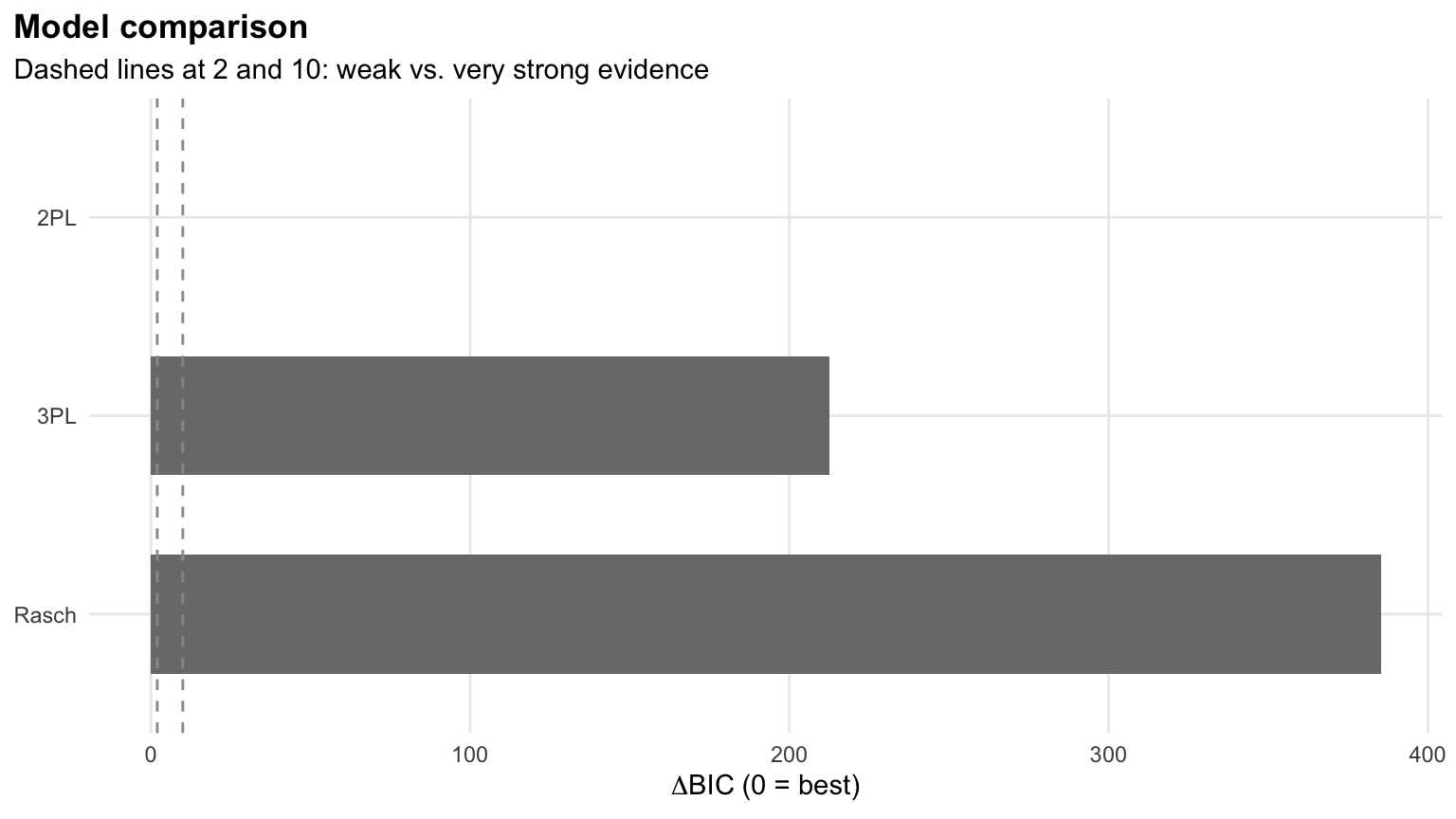
Figure 1: Model comparison returned by select_model()
The recommended model is stored in sel$best. This is an ordinary mirt model, so anything you would do with a mirt model (e.g., coef(), fscores(), or itemfit()) works with it.
mod <- sel$best
class(mod)
[1] "SingleGroupClass"
attr(,"package")
[1] "mirt"Step 2: Reading the Results in Plain Language
Once we have a model, interpret() writes a short report of what the results mean. It covers estimation, model fit, reliability, test targeting, problematic items, local dependence, and person fit.
interpret(mod)Overview
--------
* A 2PL model with 1 dimension was fitted to 2000 respondents and 30 items
(EM estimation).
* The estimation converged normally.
Model fit
---------
* Overall model fit is close: M2 = 448.13, df = 405, RMSEA = 0.007, CFI =
0.999, SRMSR = 0.018.
Reliability
-----------
* Marginal reliability is 0.88 (good).
Targeting
---------
* The average item location is 0.15 and the average person score is 0.00, so
the test is well targeted for this group.
* Measurement is most precise around theta = 0.80 (information = 8.72, SE =
0.34).
Items
-----
* No items were flagged for low discrimination, extreme location, or misfit.
Local dependence
----------------
* No item pairs show signs of local dependence (Q3).
Person fit
----------
* 2.4% of respondents have unusual response patterns (Zh < -1.96), which is
within what chance alone would produce. This summary tells us a lot about our test in a few lines. The model converged, it fits well, the reliability is good (.88), and the test is well targeted for this group of students. The test measures most precisely a little above average ability (\(\theta\) = 0.80). No item was flagged for low discrimination, extreme difficulty, or misfit (based on the \(S\)-\(X^2\) item fit statistic; Orlando & Thissen (2000)), and no item pairs showed local dependence (based on Yen’s \(Q_3\); Yen (1984)). Finally, about 2.4% of the students had unusual response patterns, which is within what we would expect by chance.
If you want a longer narrative (e.g., for the results section of a technical report), interpret_prompt(mod) packs the same results into a prompt that you can paste into an AI assistant of your choice. mirtverse does not send anything anywhere by itself.
Step 3: Tidy Outputs
The output of coef() in mirt is a list with one matrix per item, which is not very convenient for making tables. mirtverse provides tidy(), glance(), and augment() methods (following the conventions of the broom package) and an item_table() function that puts the item statistics, fit, and flags into a single data frame.
items <- item_table(mod)

items %>%
  select(item, mean, item_total_r, discrimination, location, S_X2, p.value) %>%
  head(10) %>%
  kbl(digits = 3, caption = "Item statistics for the first 10 items") %>%
kable_styling(bootstrap_options = c("striped", "hover"), full_width = TRUE)| item | mean | item_total_r | discrimination | location | S_X2 | p.value |
|---|---|---|---|---|---|---|
| N01 | 0.187 | 0.437 | 1.617 | 1.298 | 14.336 | 0.855 |
| N02 | 0.571 | 0.344 | 0.858 | -0.383 | 29.528 | 0.201 |
| N03 | 0.693 | 0.437 | 1.358 | -0.802 | 27.097 | 0.208 |
| N04 | 0.639 | 0.311 | 0.790 | -0.820 | 16.187 | 0.881 |
| N05 | 0.502 | 0.508 | 1.524 | -0.007 | 23.533 | 0.316 |
| N06 | 0.276 | 0.355 | 0.989 | 1.169 | 35.231 | 0.065 |
| N07 | 0.835 | 0.409 | 1.677 | -1.396 | 15.118 | 0.654 |
| N08 | 0.347 | 0.437 | 1.262 | 0.654 | 38.388 | 0.023 |
| N09 | 0.678 | 0.506 | 1.737 | -0.648 | 15.276 | 0.760 |
| N10 | 0.070 | 0.311 | 1.601 | 2.196 | 19.232 | 0.442 |
Here, mean is the proportion of students who answered the item correctly, item_total_r is the item-total correlation, discrimination and location are the 2PL parameters on the familiar \(a\) and \(b\) metric, and S_X2 and p.value show the item fit. Because the output is a regular data frame, we can sort it, filter it, or join it with other information about the items. For example, let’s see whether word problems are harder than symbolic items:
items %>%
  left_join(numeracy_items, by = "item") %>%
  group_by(format) %>%
  summarize(n_items = n(),
            mean_location = mean(location),
            mean_discrimination = mean(discrimination))
# A tibble: 2 × 4
format n_items mean_location mean_discrimination
<chr> <int> <dbl> <dbl>
1 Symbolic 18 -0.0549 1.20
2 Word problem 12 0.467 1.50On average, the word problems are harder (mean location of 0.47 vs. -0.05) and more discriminating (1.50 vs. 1.20) than the symbolic items in this test. glance(mod) returns a one-row summary of the model (e.g., sample size, log-likelihood, AIC, BIC, M2, RMSEA, and reliability), and augment(mod) adds the ability estimates and their standard errors to the response data.
Step 4: Graphics
All mirtverse figures are ggplot2 objects. This means that you can change their themes, labels, and colors as usual, and you can save them with ggsave(). Let’s start with the trace lines (i.e., item characteristic curves) of a few items with different difficulty levels.
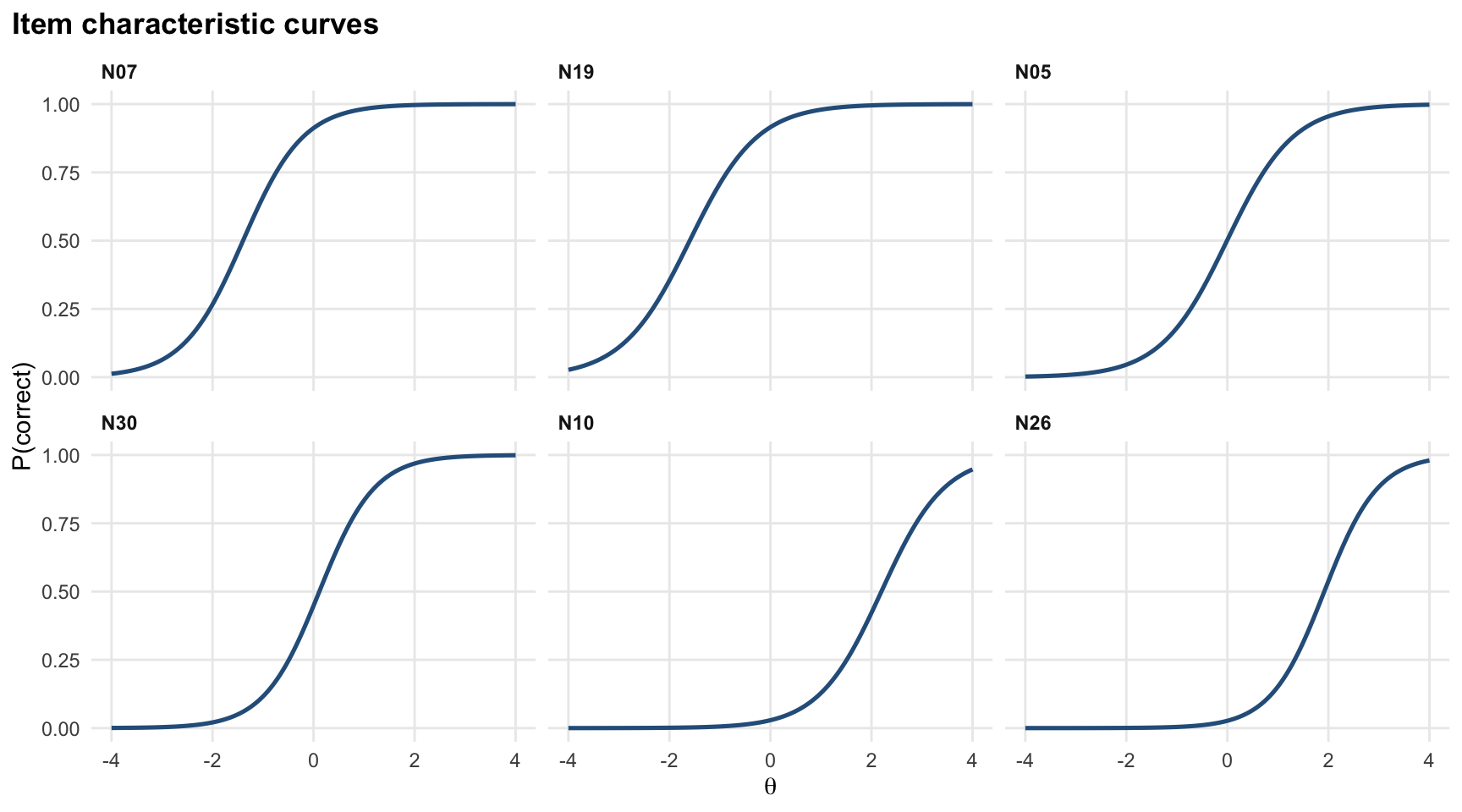
Figure 2: Item characteristic curves for six items
Items N07 and N19 are easy (most students answer them correctly even at below-average ability), N05 and N30 are in the middle, and N10 and N26 are hard (only students with high ability are likely to answer them correctly). Next, let’s look at the test information function, which shows where on the ability scale the test measures most precisely.
gg_info(mod)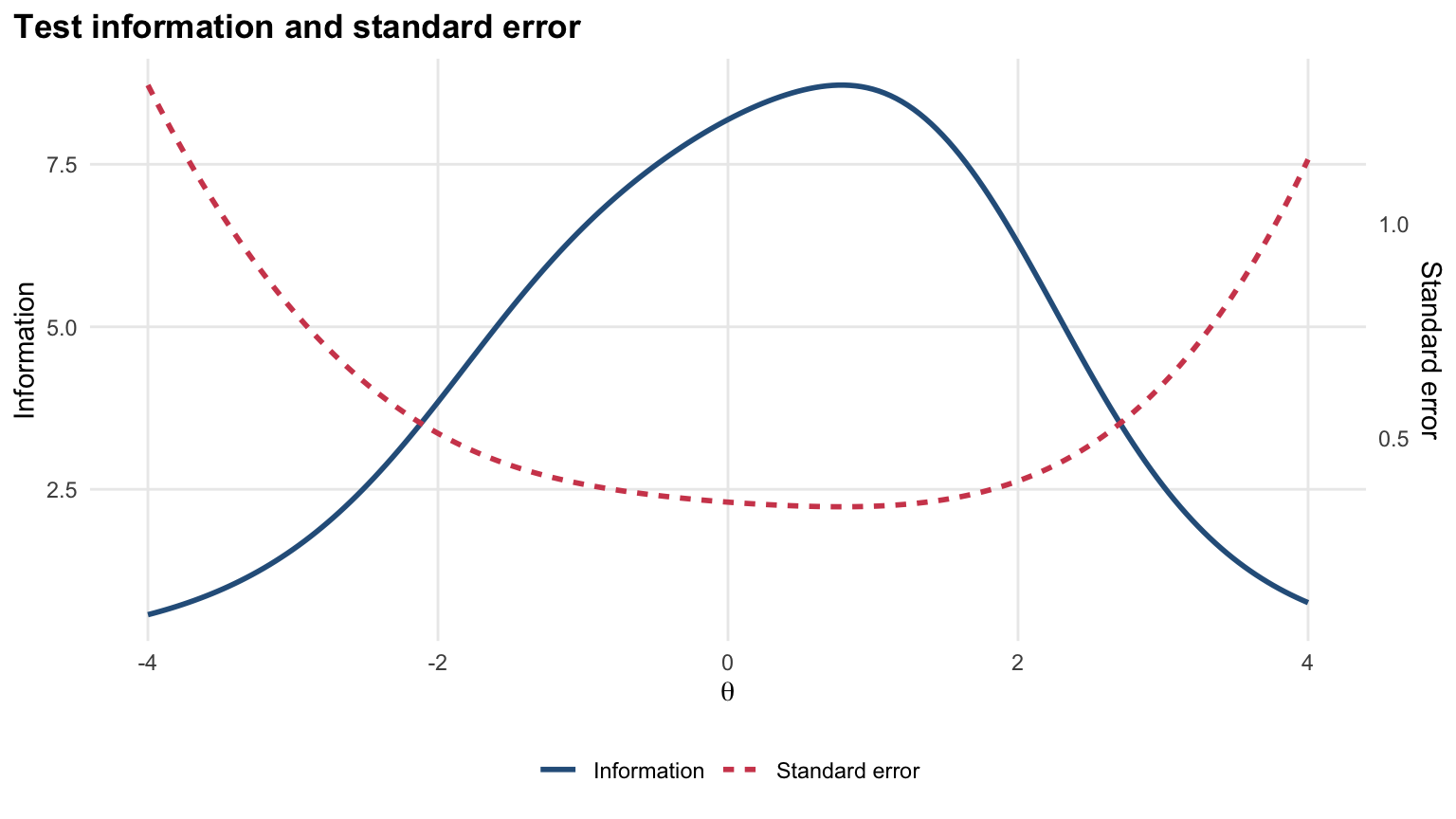
Figure 3: Test information function
The information peaks at around \(\theta\) = 0.8, which matches what interpret() told us earlier. So, the test measures average and above-average students most precisely, and it is less precise for students at the two ends of the scale. One of my favorite figures for communicating IRT results is the Wright map (also known as the person-item map). It places the students and the items on the same scale, so we can see at a glance whether the item difficulties match the students’ abilities.
gg_wright(mod)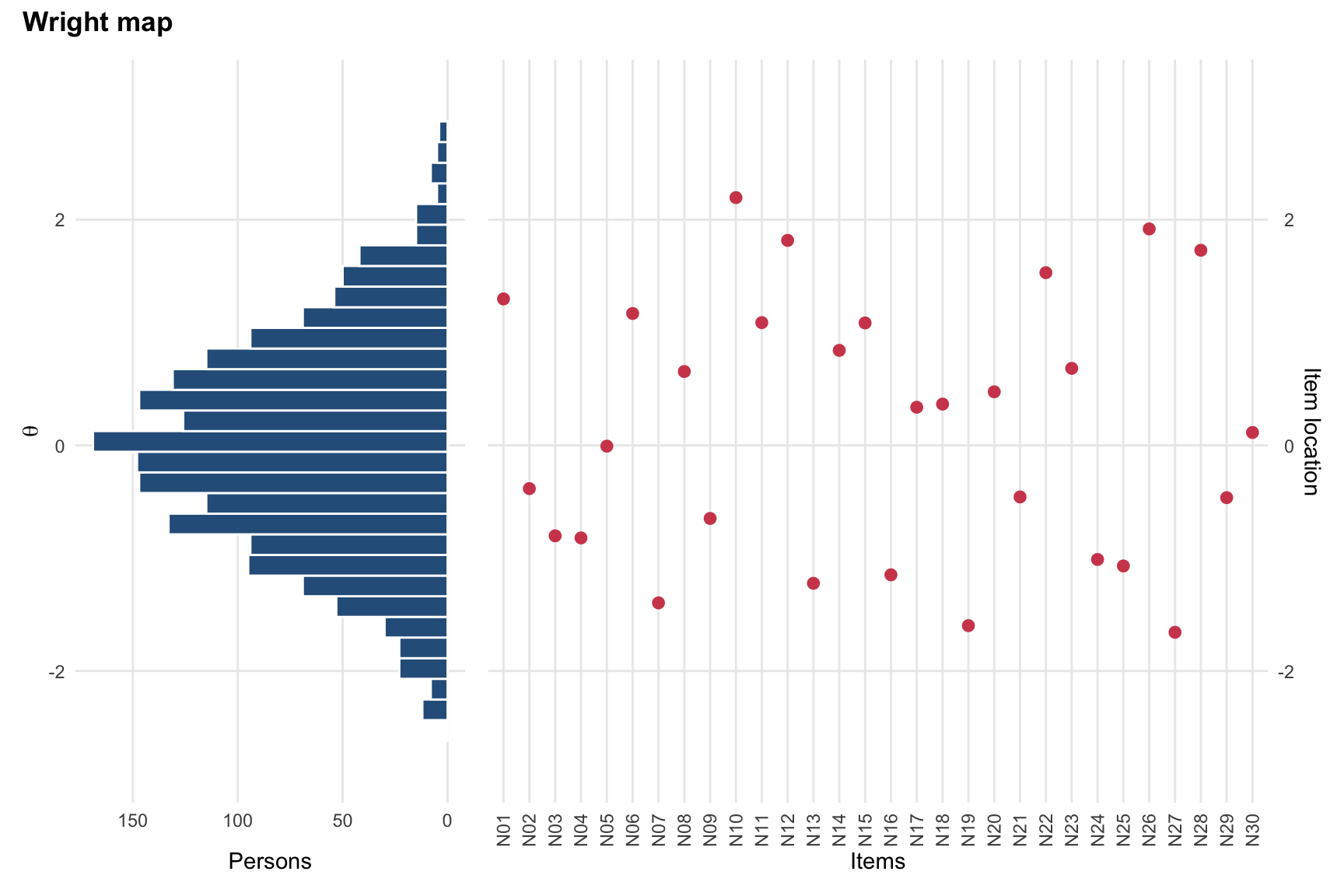
Figure 4: Wright map for the numeracy test
The histogram on the left shows the distribution of the students’ ability estimates, and the dots on the right show the item locations. The items cover most of the ability distribution, from about \(\theta\) = -1.7 to \(\theta\) = 2.2. However, there is only one item (N10) above \(\theta\) = 2 and no item below \(\theta\) = -2, although some students fall in both regions. If we wanted to distinguish among the strongest (or the weakest) students more precisely, we would need more items at that end of the scale. Other plots are also available: gg_itemfit() for item fit, gg_q3() for local dependence, gg_scores() for the score distribution, and gg_empirical() for comparing a model-implied curve with the observed proportions. autoplot(mod, type = ...) gives you access to all of them from a single function.
Step 5: Item Health Cards
When I work with test developers, we often discuss items one at a time in review meetings. For this purpose, item_card() creates a one-page summary for a single item, with its parameters, fit statistics, trace line, empirical fit, and a traffic-light status that shows whether the item needs attention.
item_card(mod, "N02")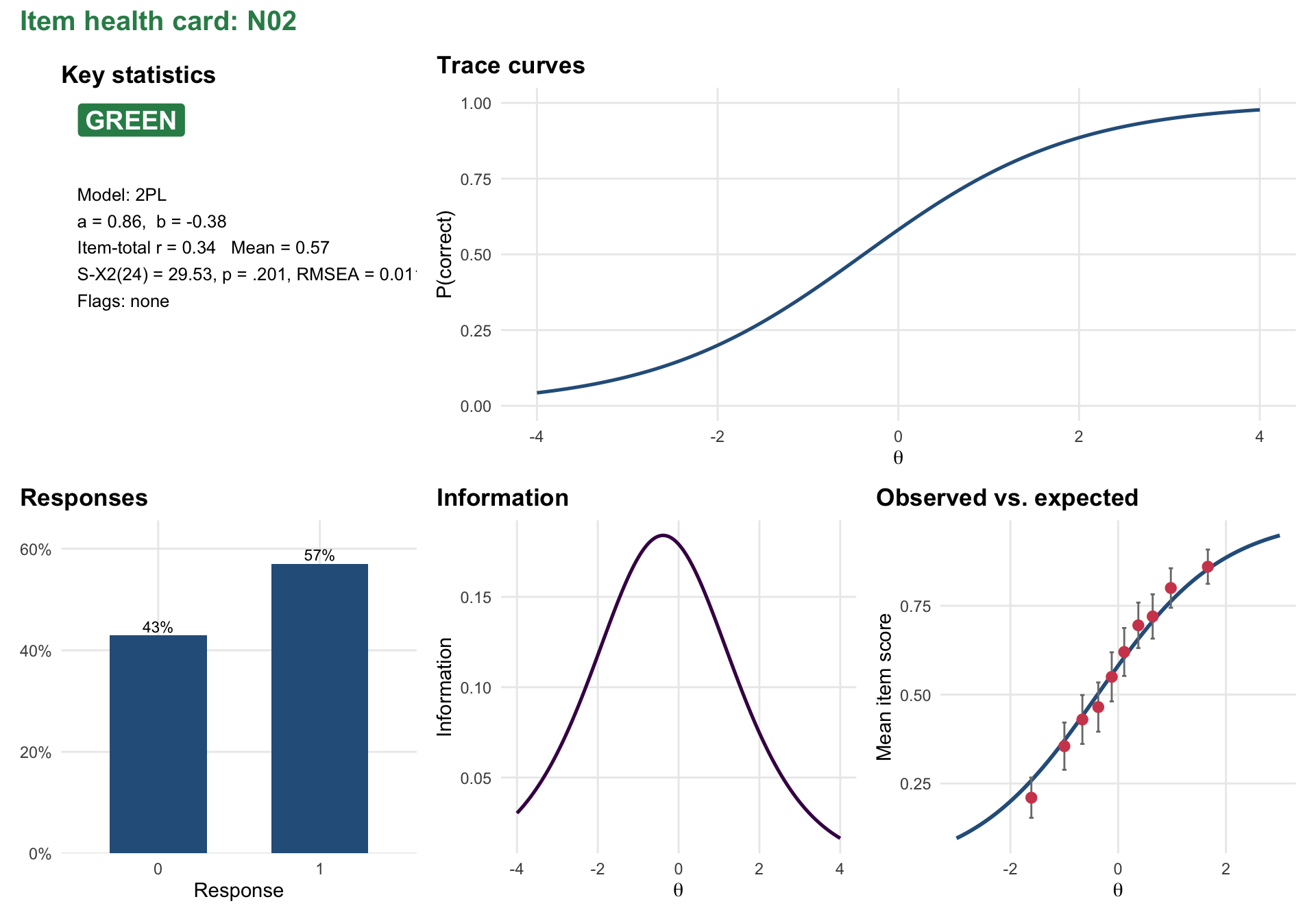
Figure 5: Item health card for item N02
To create cards for all the items at once and save them in a single HTML page, we can use item_cards(mod, file = "cards.html").
Step 6: Differential Item Functioning
An item shows differential item functioning (DIF) when students from different groups who have the same ability have different probabilities of answering it correctly. For a numeracy test, a common concern is that items with a lot of text (e.g., word problems) may be harder for English language learners for reasons unrelated to numeracy. With mirt, testing for DIF requires fitting a multiple-group model with the right constraints and then running DIF() on it. With mirtverse, dif() does all of this in one call:
dif_ell <- dif(resp, group = numeracy$ell)
dif_ell
DIF analysis: Fluent (reference) vs ELL; 30 items tested
Likelihood-ratio tests freeing a1, d; BH-adjusted p < 0.05 flags DIF
item X2 df p.value p.adjusted flag esd uesd converged
N01 5.431 2 .066 .132 0.034 0.034 TRUE
N02 53.565 2 < .001 < .001 DIF 0.004 0.155 TRUE
N03 2.370 2 .306 .382 -0.021 0.034 TRUE
N04 3.796 2 .150 .237 0.040 0.046 TRUE
N05 10.264 2 .006 .020 DIF 0.061 0.066 TRUE
N06 4.252 2 .119 .211 0.040 0.040 TRUE
N07 30.362 2 < .001 < .001 DIF -0.115 0.115 TRUE
N08 3.061 2 .216 .295 0.036 0.036 TRUE
N09 2.889 2 .236 .308 0.036 0.036 TRUE
N10 0.018 2 .991 .991 0.001 0.001 TRUE
N11 1.074 2 .584 .674 0.023 0.023 TRUE
N12 3.867 2 .145 .237 -0.003 0.019 TRUE
N13 1.669 2 .434 .521 0.015 0.024 TRUE
N14 0.215 2 .898 .929 0.007 0.009 TRUE
N15 10.473 2 .005 .020 DIF 0.046 0.046 TRUE
N16 9.278 2 .010 .029 DIF 0.061 0.064 TRUE
N17 3.292 2 .193 .289 0.025 0.035 TRUE
N18 19.528 2 < .001 < .001 DIF -0.091 0.091 TRUE
N19 0.458 2 .795 .852 0.003 0.012 TRUE
N20 47.552 2 < .001 < .001 DIF -0.143 0.143 TRUE
N21 87.260 2 < .001 < .001 DIF 0.224 0.224 TRUE
N22 6.200 2 .045 .104 0.029 0.029 TRUE
N23 6.604 2 .037 .100 0.020 0.040 TRUE
N24 4.493 2 .106 .198 0.043 0.049 TRUE
N25 47.708 2 < .001 < .001 DIF -0.168 0.168 TRUE
N26 0.969 2 .616 .684 0.009 0.009 TRUE
N27 3.084 2 .214 .295 0.038 0.038 TRUE
N28 6.310 2 .043 .104 0.032 0.032 TRUE
N29 5.452 2 .065 .132 0.054 0.055 TRUE
N30 72.568 2 < .001 < .001 DIF -0.172 0.172 TRUEdif() fits a multiple-group 2PL model, tests each item with a likelihood-ratio test by freeing its parameters across the two groups, and adjusts the p-values for multiple testing (Benjamini & Hochberg, 1995). It also reports two effect sizes: esd (expected score difference, signed) and uesd (unsigned). Negative values mean that the item is harder for the focal group (ELL students) than for reference group students with the same ability.
With 2,000 students, even small differences can be statistically significant, so it is a good idea to look at the effect sizes before drawing conclusions. gg_dif() plots the signed effect for each item and marks the items with significant DIF in red:
gg_dif(dif_ell)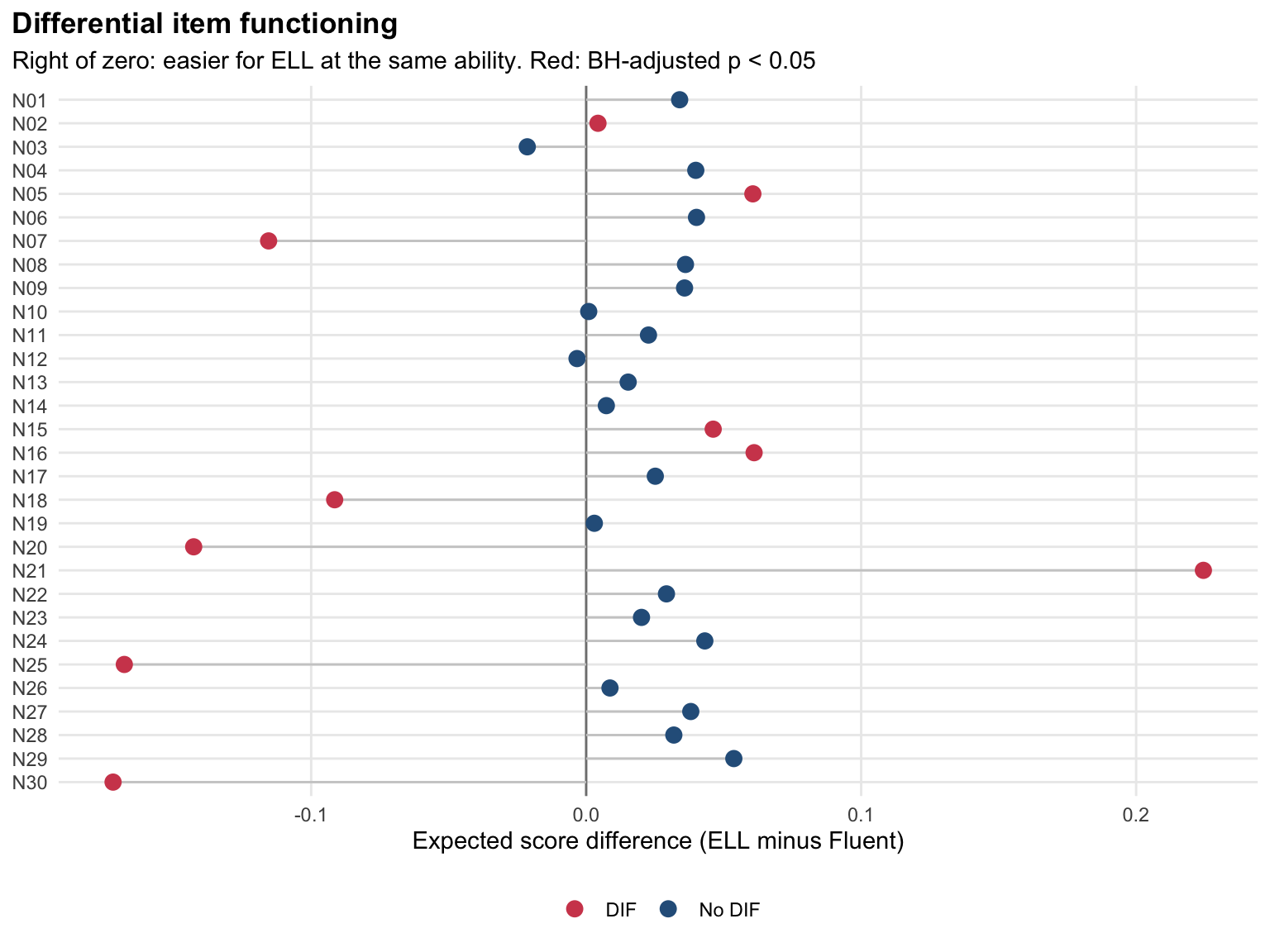
Figure 6: DIF effect sizes for ELL vs. fluent students
Seven items stand out with larger effects: N30, N25, N20, N07, and N18 are harder for ELL students, N21 is easier for them, and N02 shows non-uniform DIF (its unsigned effect is large while its signed effect is near zero, which means that the direction of the difference changes along the ability scale). Several other items (e.g., N05, N15, and N16) are statistically significant but have small effects. This is a typical pattern when all the other items are used as anchors, including the ones with DIF. A careful DIF analysis would purify the anchor set by removing the DIF items and testing again, and then ask content experts to review the flagged items. I will not go further here, but mirtverse includes an interactive teaching lab that walks through exactly this investigation (see below).
Step 7: Response Times and Rapid Guessing
In computer-based tests, we usually have the response time for each item in addition to the response itself. Response times can tell us whether a test taker engaged with an item or rapidly guessed without reading it (Wise & Kong, 2005). mirtverse fits van der Linden’s (2007) hierarchical model, which links an IRT model for the responses to a lognormal model for the response times, and flags rapid responses.
The numeracy data do not have response times, so I simulate a data set with sim_rt(), where 5% of the responses are rapid guesses. Then, I fit a 2PL model to the responses and pass it to fit_rt() together with the response times.
rt_data <- sim_rt(N = 1000, J = 20, rapid = 0.05, seed = 1)
mod_rt <- mirt(rt_data$responses, 1, itemtype = "2PL", verbose = FALSE)
fit <- fit_rt(mod_rt, rt_data$rt)
fit
Joint model for responses and response times (van der Linden, 2007)
1000 persons, 20 items; converged after 6 iterations; logLik = -31044.91
Speed SD = 0.364 (SE 0.012); ability-speed correlation = -0.297 (SE 0.038)
item beta se_beta alpha se_alpha prop_rapid
Item01 3.886 0.023 1.959 0.041 0.015
Item02 3.845 0.026 1.651 0.036 0.026
Item03 4.190 0.027 1.607 0.031 0.017
Item04 4.187 0.027 1.440 0.030 0.019
Item05 3.717 0.024 1.860 0.033 0.018
Item06 3.679 0.027 1.561 0.036 0.028
Item07 4.075 0.027 1.591 0.029 0.022
Item08 4.261 0.027 1.469 0.030 0.024
Item09 3.917 0.029 1.409 0.032 0.025
Item10 4.314 0.027 1.713 0.032 0.020
Item11 4.114 0.026 1.637 0.032 0.024
Item12 3.739 0.028 1.387 0.032 0.022
Item13 4.102 0.029 1.379 0.030 0.026
Item14 3.464 0.026 1.710 0.037 0.023
Item15 4.531 0.025 1.815 0.031 0.021
Item16 4.766 0.025 1.727 0.030 0.017
Item17 3.801 0.026 1.620 0.034 0.025
Item18 3.529 0.025 1.676 0.037 0.021
Item19 4.187 0.026 1.787 0.035 0.019
Item20 3.934 0.026 1.655 0.037 0.023
Rapid responses (residual): 2.2% overall; mean response time effort = 0.978For each item, beta is the time intensity (how long the item takes on the log scale) and alpha is the time discrimination (how consistent the response times are). The model also estimates the correlation between ability and speed (-.30 here, meaning that, in this simulation, more able test takers tend to work a little more slowly). The last line shows that 2.2% of all the responses were flagged as rapid and that the average response time effort is .98. In a real data set, test takers with low response time effort are the ones whose scores we should interpret with caution.
Step 8: Sharing the Results
So far, we have done everything in the R console. In practice, we also need to share the results with others. mirtverse offers three ways to do this, depending on the audience:
mv_report()writes a single HTML report with the model comparison, the interpretation, tables, figures, a sum-score conversion table, item health cards, and the R code that reproduces everything.mv_dashboard()builds an interactive Shiny dashboard for people who do not use R (e.g., test developers or a program manager).export_dashboard(format = "html")saves it as one self-contained HTML file that can be emailed and opened in any browser, without R or an internet connection. The dashboard holds summaries only, never the raw item responses.launch_workbench()opens a point-and-click app for users who want to run the analysis themselves without writing code. Every step in the workbench shows the R code it runs, so the analysis stays reproducible.
# A complete HTML report
mv_report(sel, file = "numeracy-report.html", title = "Numeracy test")

# An offline dashboard to email to colleagues
export_dashboard(mod, "numeracy-dashboard.html", format = "html")

# A point-and-click workbench
launch_workbench()
The following screenshot shows the top of the HTML report created with the first line above.
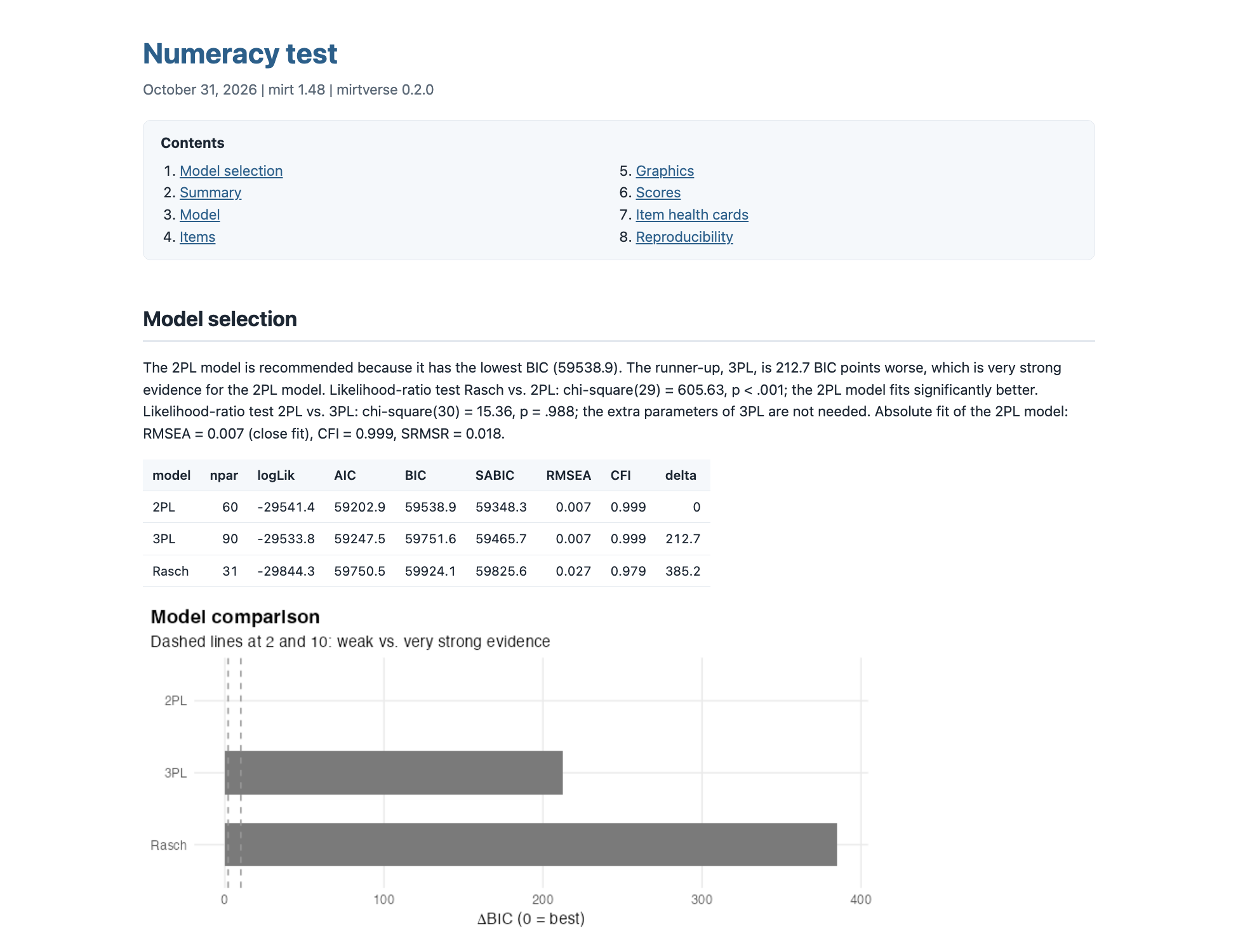
Figure 7: The HTML report created by mv_report()
Other Features
There are three more features that I want to mention briefly. Each of them has its own article on the package website.
- Analysis scripts from plain language:
mv_ask()turns a request such as “fit a 2PL, check DIF by gender and make a report” into a complete, commented R script. It uses a language model (Claude, OpenAI GPT, or a local Ollama model) that you set up once withmv_ask_setup(). The script is checked before it is returned, and you can run it withrun_script(). - Coming from other packages: If you have code written for ltm, eRm, TAM, or irtQ,
mirtify()translates it into mirt code and adds a comment wherever the packages differ. For example:
mirtify: 4 of 4 statements translated from ltm

# mirtverse loads mirt, so one library() call covers both.
library(mirtverse)
# ltm integrates over 21 Gauss-Hermite points and mirt over 61 points, so
# estimates can differ slightly (usually in the second or third decimal).
fit <- mirt(LSAT, 1, itemtype = "2PL", SE = TRUE)
# ltm's empirical Bayes scores are the posterior modes, which mirt calls MAP.
# Like ltm, full.scores = FALSE returns one row per observed response
# pattern; drop it to get one score per person.
fscores(fit, method = "MAP", full.scores = FALSE)
# Both use Yen's Q1-type chi-square with 10 ability groups, but the groups
# are formed differently, so the statistics differ a little. fit_stats =
# "S_X2" is usually preferred in mirt.
itemfit(fit, fit_stats = "X2")
Notice how each translated line comes with a short note that explains what changes between the two packages (e.g., the number of quadrature points or the name of the scoring method). This is useful not only for switching packages but also for understanding why the same model can give slightly different estimates in different packages.
- Teaching labs: For instructors, mirtverse includes three interactive labs built with learnr. In each lab, students fit live mirt models and make realistic testing decisions, with feedback on every choice.
run_lab("model-choice")asks students to choose a model that a certification board can defend,run_lab("decisions")goes from item parameters to pass/fail decisions, andrun_lab("fairness")investigates a complaint that the numeracy test we used above is biased against English language learners. The DIF results we saw in Step 6 are the starting point of that lab.
Concluding Remarks
In this post, I introduced mirtverse, an R package that makes the mirt package easier to use, especially for users who are new to R or to IRT. Here are the main takeaways:
- mirt remains the engine. mirtverse does not change how models are estimated. Every function takes an ordinary mirt model, so you can combine the two packages freely.
- Model selection and interpretation take one line each.
select_model()compares the candidate models and explains its recommendation, andinterpret()summarizes fit, reliability, targeting, and problematic items in plain language. - Outputs are ready to use. Tables are tidy data frames, and figures (including Wright maps and item health cards) are ggplot2 objects.
- Common follow-up analyses are built in. DIF, response times, and rapid guessing each need a single function call.
- Results can be shared with anyone. Reports, offline dashboards, and a point-and-click workbench serve audiences who do not use R.
mirtverse is still young (the current version is 0.2.0), so I would love to hear your feedback. If you find a bug or have an idea for a new feature, please open an issue on GitHub. In my next post, I will introduce the assessment pipeline in mirtverse, which takes a test from its blueprint to the monitoring of its item bank, with human oversight at every stage. Finally, if you use mirtverse in your work, please cite mirt (Chalmers, 2012) together with mirtverse (Bulut, 2026). Happy modeling!